When you signed up to start earning online, you never expected it to also come with a spine health bill, right? Because somewhere on earth now, a freelancer is trying to explain a back pain she cannot trace to any single injury. She never fell, never lifted anything heavy. She just sat at a desk for two years, chasing deadlines and growing her income, while her spine slowly bent itself into a shape she didn’t sign up for. That bill comes due when the pain starts, and sitting at a desk consistently is exactly where the damage was created.
The worst part is that none of it happens because you are lazy or careless. It also happened because nobody ever showed you the small, specific fixes that work for how you really sit before you started hunching over a laptop, sitting half on a couch, or focusing cameras for a client call. But Calvary just arrived with these nine fixes to cancel that health bill before it ever gets sent.
1. Stop making your neck carry a bowling ball
Naturally, a laptop screen sits lower than a proper monitor, which forces your head to tilt down for hours. Dr. Kenneth Hansraj’s cervical spine study, published through the National Library of Medicine, found that tilting your head forward just 15 degrees adds roughly 27 pounds of force on the neck, and at 60 degrees, the number climbs to 60 pounds.
If you weigh them, that is close to the weight of a bowling ball resting on your spine for hours at a stretch. The simple fix is to get a good laptop stand or stack books, a box, or a sturdy binder under your laptop until the top of the screen sits level with your eyes, then adjust your desk height so your elbows still rest comfortably.
2. A $15 keyboard fixes what chiropractors charge for
Notice that once you raise your screen, your keyboard rises with it, which forces your shoulders up too, unless you separate the two. When I changed my workspace, I noticed that typing for six hours straight felt different with a separate keyboard and mouse.
The thing is that an elevated screen, a separate lower keyboard, and a mouse let your screen stay at eye level while your hands stay low and relaxed, something a laptop alone simply cannot offer.
3. Empty your back pocket before you sit down
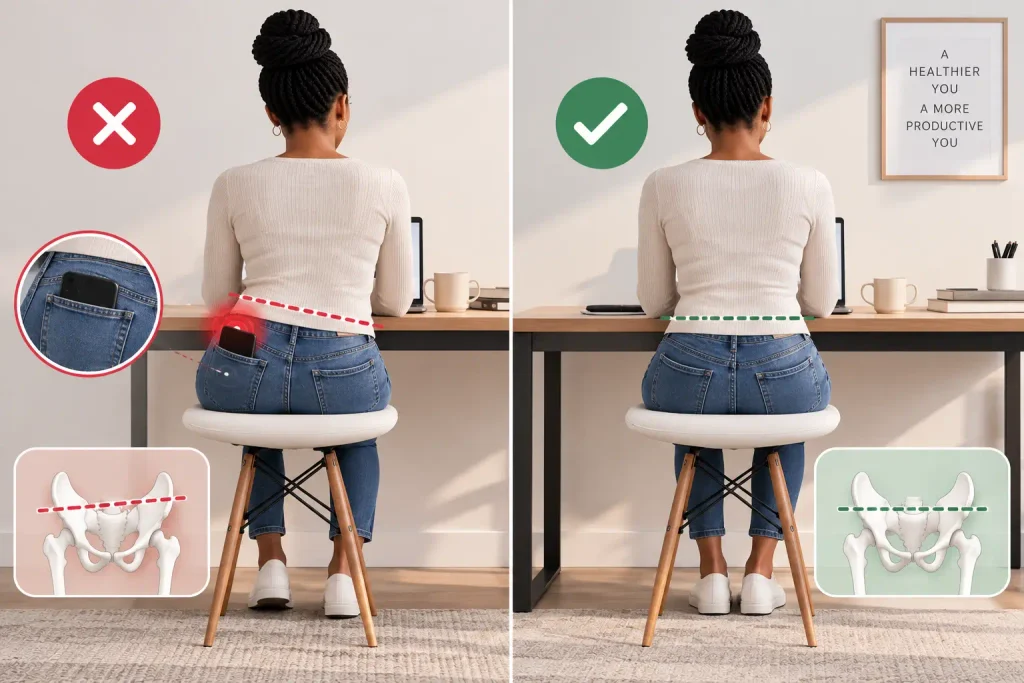
You may not realize this, but leaving a wallet or phone in your back pocket tilts your pelvis unevenly every time you sit. Imagine you have two jobs: working as a delivery-app driver while also doing your virtual assistant work. You split shifts between your car and kitchen table and need to carry your wallet. You’ll often do this without noticing.
Over weeks, that small tilt will pull your spine slightly off center, straining one side of your lower back. However, emptying your pockets before sitting at your desk takes two seconds and removes a hidden cause of lopsided pain.
4. The 5-second mirror check before sitting at a desk to join a call
Client-facing work can add a layer you honestly don’t check: the camera. As a digital earner sitting at a desk and about to join a video call, you may straighten up the moment the camera turns on, then slowly collapse back into a slump once the call feels comfortable.
So, before joining any video call, glance in a mirror or your camera preview for five seconds and reset your shoulders back and down. It will help you to turn your appearance habit into a spine-saving one.
5. The couch is lying to you about comfort
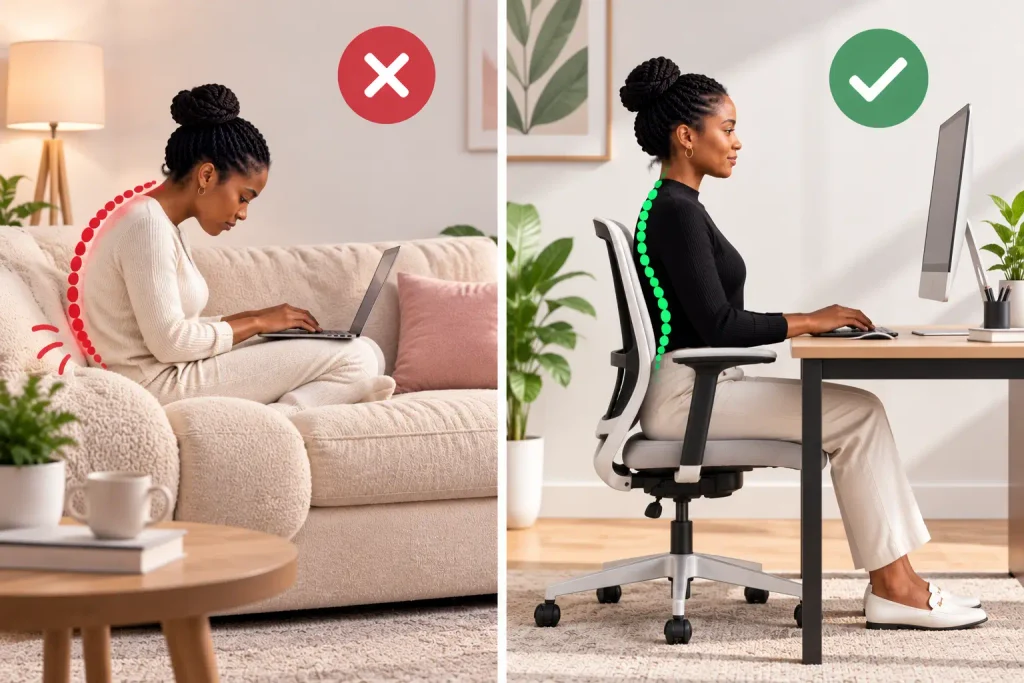
Soft furniture feels relaxing for the first ten minutes, then it slowly pulls your spine into a curved C-shape that your lower back pays for later. Just because you have the freedom to work anywhere doesn’t mean you should work from a bed or couch regularly.
Yes, I understand you need comfort, and it can pass for convenience too, but you often mistake numbness for comfort. If you don’t have a proper desk, a firm cushion behind your lower back and a laptop stand can work, and they will correct most of the damage a couch or bed can cause over time.
6. Stop leaning toward your mouse without noticing
An off-center mouse pulls one shoulder forward and down without any conscious effort from you. Working for hours with an off-center mouse can make you develop a visible lean toward the mouse side.
Therefore, center your keyboard with your body, not your screen, and keep the mouse close enough that your elbow barely has to travel to reach it.
7. If your feet dangle, your spine pays the difference
When your feet don’t reach the floor, your weight will shift backward into your lower spine instead of distributing evenly. That is why ergonomic setup is personal and so important: imagine a shorter digital earner sitting at a taller digital earner’s desk setup who uses a standard office chair.
If she doesn’t adjust her chair height, she’ll get back pain. Assuming there is no way around the situation, she can stack up old magazines or a small step stool under her feet. It solves the problem instantly and costs nothing.
8. Let every notification sound reset your spine
One way to consistently check your posture instead of relying on good ol’ memory is to borrow a sound you already hear constantly. That exact notification sound you hear every day while sitting at your desk and working can serve as a posture-reset cue, pulling your shoulders back and lifting your chest each time it plays.
This works because it attaches a new habit to something your brain already responds to automatically.
9. The wall test that tells you the truth
Many people who make money online have forgotten what standing straight actually feels like. Let’s do a little bit of exercise, if you don’t mind. Stand with your back, shoulders, and head touching a wall for ten seconds, then walk to your chair and try to hold that exact same alignment while sitting at a desk.
If you do this at least once every few hours, you’d discover that your “normal” sitting position had already drifted far more than you assumed.
Notably, none of these nine fixes require new furniture or a redesigned home office. They work because they target the specific habits digital earners fall into: laptops instead of monitors, couches instead of desks, cameras instead of privacy.
When you apply these fixes consistently, they protect the one tool you and every other online income earner depend on completely: your body.
Fix your posture the same way you fix a broken workflow, one small correction at a time. Bookmark this blog for practical guides built specifically for digital earners who want their bodies to last as long as their careers do.
FAQs
How do I know if my sitting desk height is wrong?
Sit normally and check your elbows. If they are noticeably higher or lower than your keyboard, or your screen forces your chin down, your height setup needs adjusting.
Can bad posture affect how well I work?
Yes, poor posture reduces circulation and increases fatigue, which slows focus and makes long client sessions harder to sustain without breaks.
I work from bed most days; is that automatically bad?
Not automatically, but it requires extra support like a firm cushion and a raised laptop screen to avoid the spinal curve a soft mattress encourages.
How often should I do the wall test?
Once every two to three hours is enough to catch posture drift before it becomes the default position your body settles into.
Does an expensive ergonomic chair fix posture on its own?
No, a good chair helps, but posture habits like screen height, foot support, and regular resets matter more than the chair’s price.
Is it too late to fix posture damage from years of desk work?
No, the body adapts continuously. Consistent small corrections, like the ones in this list, can noticeably reduce pain and improve alignment within weeks.